
You should only travel to the UK from/after the start date shown on your Visa/vignette. This is the valid from date.
You must not make arrangements to travel to the UK until UKVI have confirmed your Visa has been granted.
Once you arrive in the UK, you will need to provide the University with a copy of your Sharecode to confirm the type of immigration permission you hold.
This guide is to provide you with information that you may find useful prior to travelling in the UK, ensuring a smooth transition to life and study here. For a more thorough guide about coming to the UK please read the Moving to the UK Moving to the UK guide from the British Council.
The University offers a meet and greet service that will take you from the airport, bus or train station in Newcastle to your University accommodation. You should book this in advance via the University’s Meet and Greet webpage.
The University also runs an Induction and Welcome week, which is a great opportunity to make new friends and learn about the services offered by the University. You will be given access to our new student hub nearer to the start of your course and this will contain all the information on enrolling, induction and other important information for your first few weeks at Northumbria.
Documents to keep in your hand luggage
- Useful contact details
- A copy of the address where you will be staying in the UK
- A valid passport, linked to your eVisa via your UKVI account (with visa or UK entry clearance, if applicable)
- A printout (or accessible digital copy) of your UKVI account profile page showing your eVisa details, along with your share code (a 9-character code, valid for 90 days, used to prove your immigration status to airlines and Border Force)
- A printout of your visa approval/decision email
- Your travel ticket (s) -- plane, train, ferry -- as evidence of your date of arrival
- Vaccination and X-ray (TB) certificates, where required
- Your offer letter and CAS from the University
- Evidence that you have sufficient funds to pay your tuition fees and accommodation
- Originals, or certified copies, of any evidence mentioned on your CAS
- British money or travellers cheques. Ensure you have enough to cover immediate expenses, such as customs charges, train fares, and food
As a student who requires immigration permission to enter the UK, you must complete a Right to Study check before you can enrol and begin your studies.
You can start your Right to Study check from your home country, but it can only be completed when you arrive in the UK and upload your proof of entry.
Once you have uploaded all the information required for the Right to Study check, the University will review and verify your documentation. When we have completed this, we will email you to confirm you have the right to study in the UK and can now enrol.
Documents you will need to upload to complete your Right to Study check:
- A copy of your passport
- eVisa share code and share code expiry date OR visitor visa/ETA
- Proof of entry to the UK - boarding pass OR stamped transit visa (if you have been issued with one)
Before you travel to the UK, you will be required to have submitted and have a successful application for a Student Route Visa .
When your application is successful, you will then be required to provide a copy of your electronic visa (eVisa) at the border when entering the UK. This will confirm that you have valid leave to be in the UK and are here for the purposes of studying on your chosen programme of study with us here at the University.
To access this, you will need to create a UKVI online account, which you can do by going to the following website: www.gov.uk/get-access-evisa
You will need to have your application reference number available to be able to create your account (this should start with GWF).
Please also ensure that you have downloaded the ‘UK Immigration Application ID Check’ app, as you will need this to confirm your identity when creating your UKVI account.

Step 1: Fill in Your Details
You will need to fill in your personal information to be able to create your account. Please ensure this is correct with no errors as this could lead to issues later in the process.
Step 2: Confirm Your Identity
Use the ‘UK Immigration Application ID Check App’ to confirm your identity. We recommend you use your Passport to confirm this.
Read and follow all instructions via this app when taking your ID photo and scanning your passport.
You will then be prompted to take your personal ID photograph.
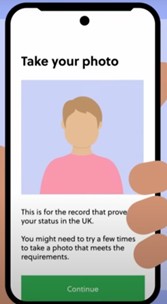
When taking your photograph, use a plain background in a room with good lighting to make sure your face is clearly visible. You may need to try a few times to get a photograph that is clear enough to be used.
Once the app confirms your photograph is suitable, click onto the next stage.
Step 3: Link Your UKVI Account to Your Visa
For this step, you will be asked to complete several sections of a ‘checklist’. When you have successfully completed all these sections, you will see a ‘COMPLETED’ button next to each stage.
You will then need to carefully read through the ‘Declaration’ section and confirm you are happy with the information shown here, then click ‘Confirm and Submit’.

UKVI will then send you an email to confirm when your eVisa is ready to be viewed. In some circumstances, this can take a few days to be sent to you. Please also make sure you check your spam/junk folders in your email inbox.
Once your account has been successfully created, you eVisa will then automatically be linked to your UKVI online account.
This is when you will need to generate your ‘Sharecode’ you can do this by visiting the following website: https://www.gov.uk/view-prove-immigration-status

Read through all instructions carefully and then generate your unique sharecode. The code should begin with the letter ‘S’ , will be 9 characters long and a mixture of letters and numbers. This is the code that the University will ask you to provide as part of your Enrolment/Right to Study checks.
If you fail to provide the correct documentation as part of your Enrolment/Right to Study checks, this will then delay you being able to begin your studies.
Enrichment week is not part of the University’s vacation period and when you arrive you are expected to attend. If you hold a Student Route visa sponsored by Northumbria University, your visa may be impacted if you exit the UK during Enrichment week. Please carefully read the information on the visa implications of travel or absence during term time and follow the instructions in that article before leaving the UK during term time.
*If your programme is part of the pilot, your timetable will reflect this. Programme teams will share further details on your enrichment week(s). See below for details of central events and activities.
Page last reviewed: 24 July 2026
